Xtract2AI is an AI-powered SCORM extraction platform that converts legacy SCORM eLearning packages into structured, machine-readable formats like JSON, CSV, and text. It enables organizations to make their learning content searchable, analyzable, and usable for AI agents and LMS migrations.
Visit the Xtract2AI microsite and click Sign Up.
Fill the Registration details
After submission, a verification email is sent to your registered email ID, and you need to click the activation link in the email to verify your account.
After verification, confirm your password to activate your account.
You will receive reminder emails before expiry and on the expiry date.
After 14 days, your trial expires, and upload/extraction functions are disabled until you purchase a plan.
The dashboard is divided into the following main sections:
Total number of courses successfully analyzed by the system.
Amount of storage space currently utilized in your account.
Total count of files processed with successful content extraction.
Number of files where extraction was unsuccessful or incomplete.
Total courses uploaded to your repository for processing.
Overall storage capacity assigned to your account.
Total duration of uploaded audio and video content.
Date until your current subscription plan remains active.
Access the courses section from your dashboard.
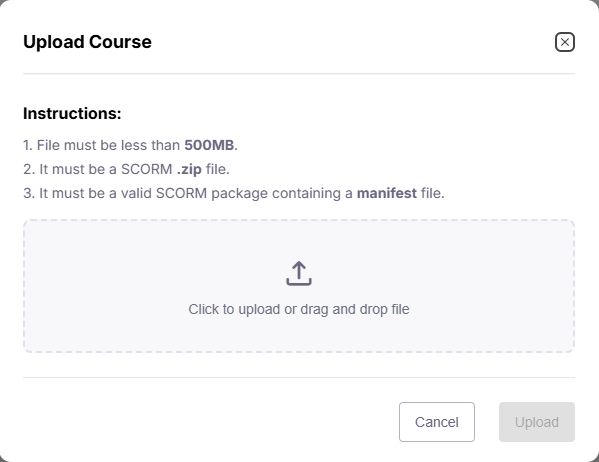
Select the upload button to begin the process.
Choose a valid SCORM .zip file from your computer.
System checks file size, format, and manifest automatically.
Content extraction runs automatically after successful upload.
You can then view your extracted content on the Preview page.
This feature is ideal for teams migrating multiple SCORM courses or managing large content libraries.
Exposed secure, well-documented REST APIs to enable clients to directly upload and manage SCORM courses from their systems.
Implemented webhook support for real-time event notifications (e.g., upload completion, extraction status, or processing errors).
Enabled end-to-end monitoring and logging of API usage for transparency, debugging, and analytics.
Supported seamless integration with external systems and partner platforms to embed xTract2AI’s capabilities into their existing workflows.
Click “Forgot Password” on the login screen
Verify file format, size, and re-upload from Repository
Go to Subscriptions to upgrade
Check spam or request resend
Contact support@xtract2ai.com for technical issues.
Developers can use APIs for automation and integrations. API Documentation: Click Here